NVIDIA Nsight Visual Studio Edition 2.2 User Guide > Analysis Tools > Other Analysis Reports > The Summary Report

The Summary Report is a synopsis of the data recorded during a single capture session. It contains data about the capture itself, such as the duration of the capture. It also contains a summary of the domain-specific data. For example, if you were analyzing a DirectX application, the Summary Report would contain a section specifically on the DirectX data collected. The Summary Report also contains a Session Overview, and links to more detailed reports.


Session Overview

The Session Overview section of the Summary Report contains an overview of the capture that was performed, and includes hyperlinks to more detailed information on other report pages. This shows the very basic information about the capture, such as the target application, the capture duration, date, command line parameters, and any other variables.

The header of each section includes direct links to all available reports for this domain. For example, you can directly jump to the timeline with a single click from the top of page.
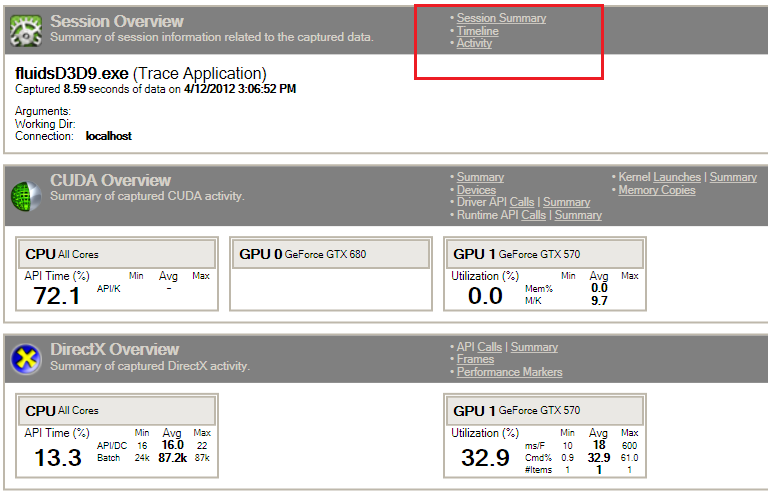

This screen would display a warning message, if something went wrong during data capture or loading the report file.
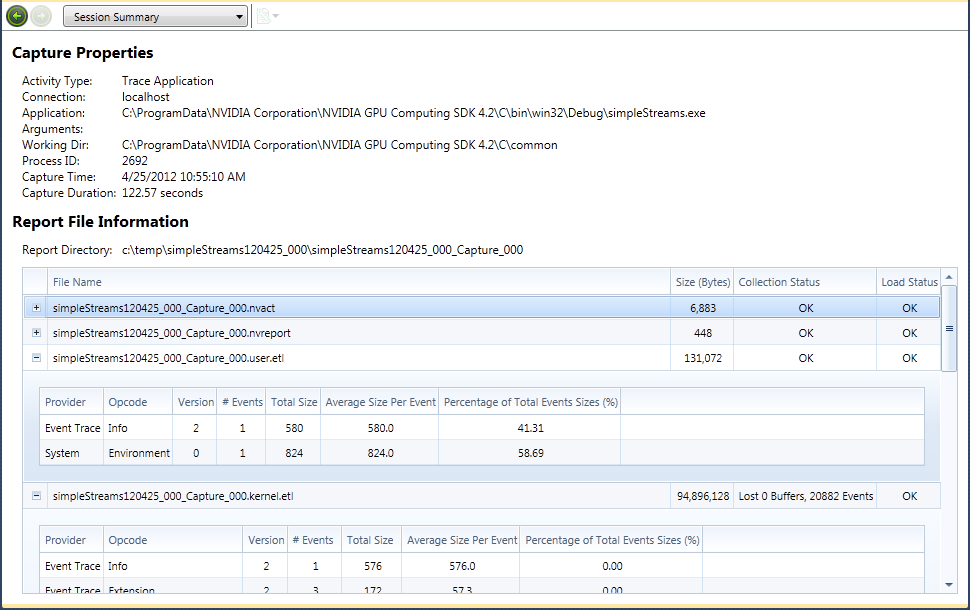

Session Summary

The Session Summary portion of the Summary Report shows a high level summary of the capture session.


NVIDIA® Nsight™ Development Platform, Visual Studio Edition User Guide Rev. 2.2.120522 ©2009-2012. NVIDIA Corporation. All Rights Reserved.